

1 Codebase, 7 Products — How I Run an Entire Ecosystem on Laravel
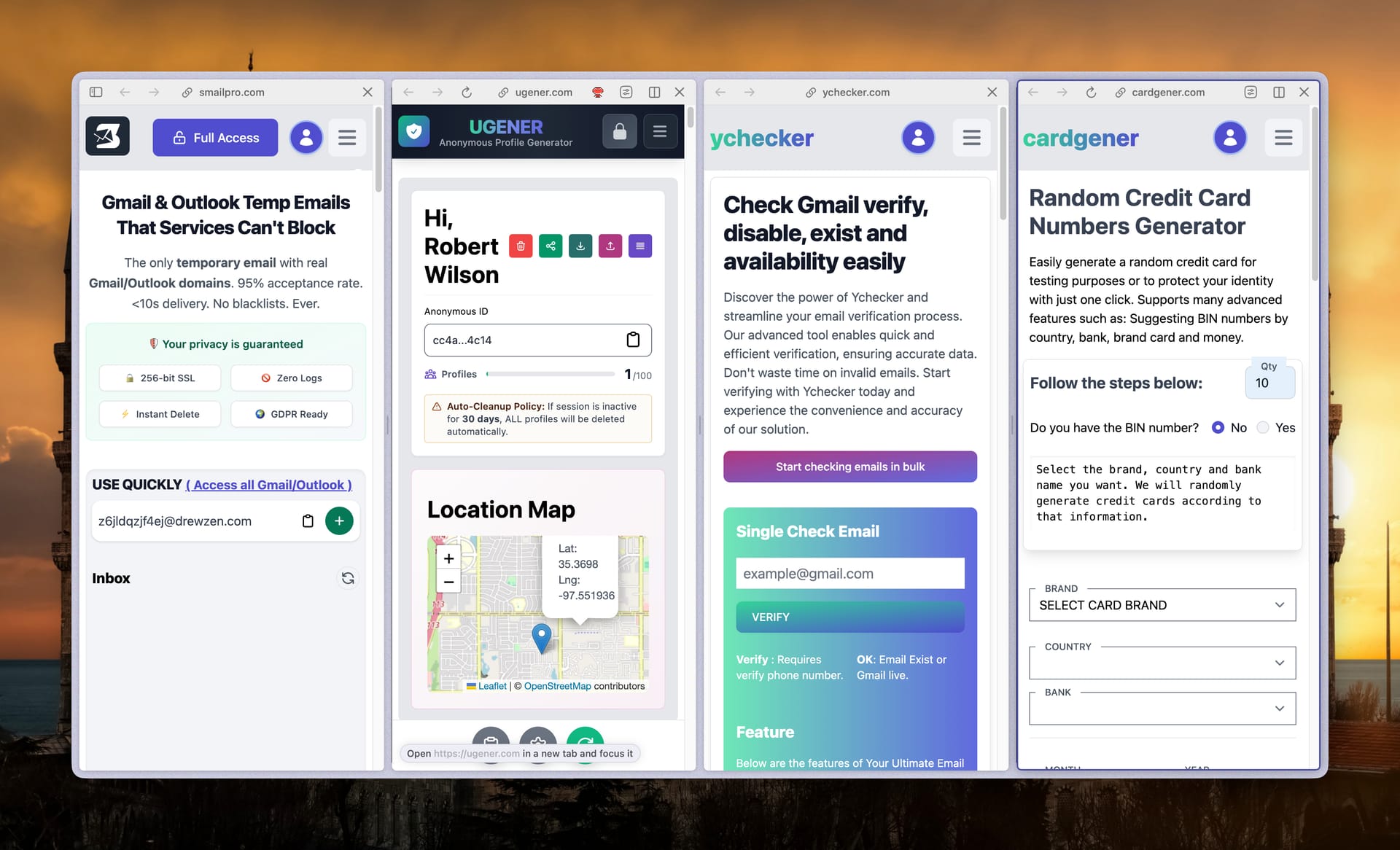
Laravel codebase running an entire web ecosystem, operated by 1 person — the story of going from managing separate projects to building a shared, automated system.
Multiple web products. One person running the whole thing — me. No engineering team. No co-founder who codes. No outsourcing.
Everything I do comes down to one core goal: taking back my time. I'd rather spend my evenings taking the family out to eat, sharing a beer with friends, or heading out fishing — than grinding through the same dumb logic for the fifth time in a row.
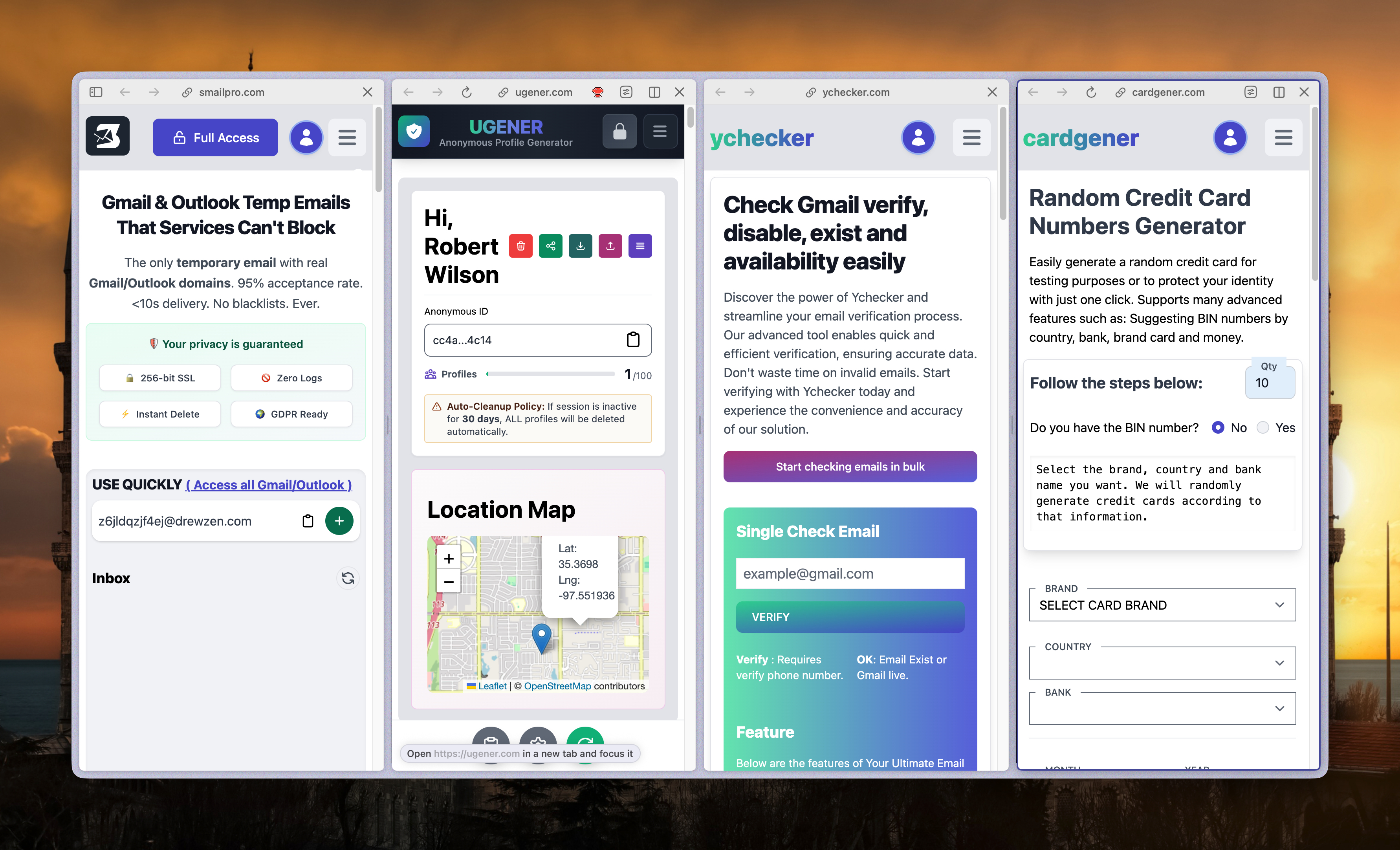
That stubbornness about wasted time pushed me toward building systems rather than building products one by one. The result: a single Laravel codebase running my entire web ecosystem — SmailPro, YChecker, Smser, CardGener, UGener, StoreGmail, and my.sonjj.com — from one place.
This is the story behind that system. Why it exists. How it works. And if you're managing a bunch of disconnected sites and feeling burned out... you're probably exactly where I was.
When Every Website Is Its Own Headache
Before this system, every product was its own Laravel project. SmailPro had its own repo. YChecker had its own. Smser, same. Each with its own database, its own auth, its own codebase.
It was fine in the early days — each project was small, easy to focus on. But once I started running 3, 4, then 5 products in parallel, the problems started piling up in an increasingly annoying way.
Adding one small feature — say, a Google login button — meant doing it in SmailPro, then copying it to YChecker, then Smser, then on down the list. Seven commits. Seven deploys. Seven chances to forget something or break something without knowing.
Users were stuck too. Someone who signed up for SmailPro and wanted to try YChecker had to create a brand new account. They had no idea both products were from the same person. And I had no way to connect those two accounts — no way to tell them, "You've already got an account, just use the same email."
The breaking point came during a late-night bug fix session. I fixed the bug in YChecker, reviewed the code, and realized SmailPro had the exact same bug. Fixed it. Then remembered Smser had it too. Fixed it again.
Halfway through that third fix of the same bug in one night, I stopped.
I've done this exact thing three times already.
And the obvious question came up: is there a way to do this once instead of seven times?
1 Codebase, Many Products — the Decision That Changed Everything
Think of it this way: instead of running several separate restaurants with independent kitchens, I built one central kitchen and all the websites are just storefronts connected to it. Upgrade the kitchen once → every outlet benefits immediately. No cleaning up each place separately.
That's how the Laravel multi-tenant setup works in my ecosystem. One codebase — each domain is automatically identified and served the right content, the right config for that product. SmailPro.com, YChecker.com, Smser.net — each looks different to the user, but they all run from the same engine underneath.
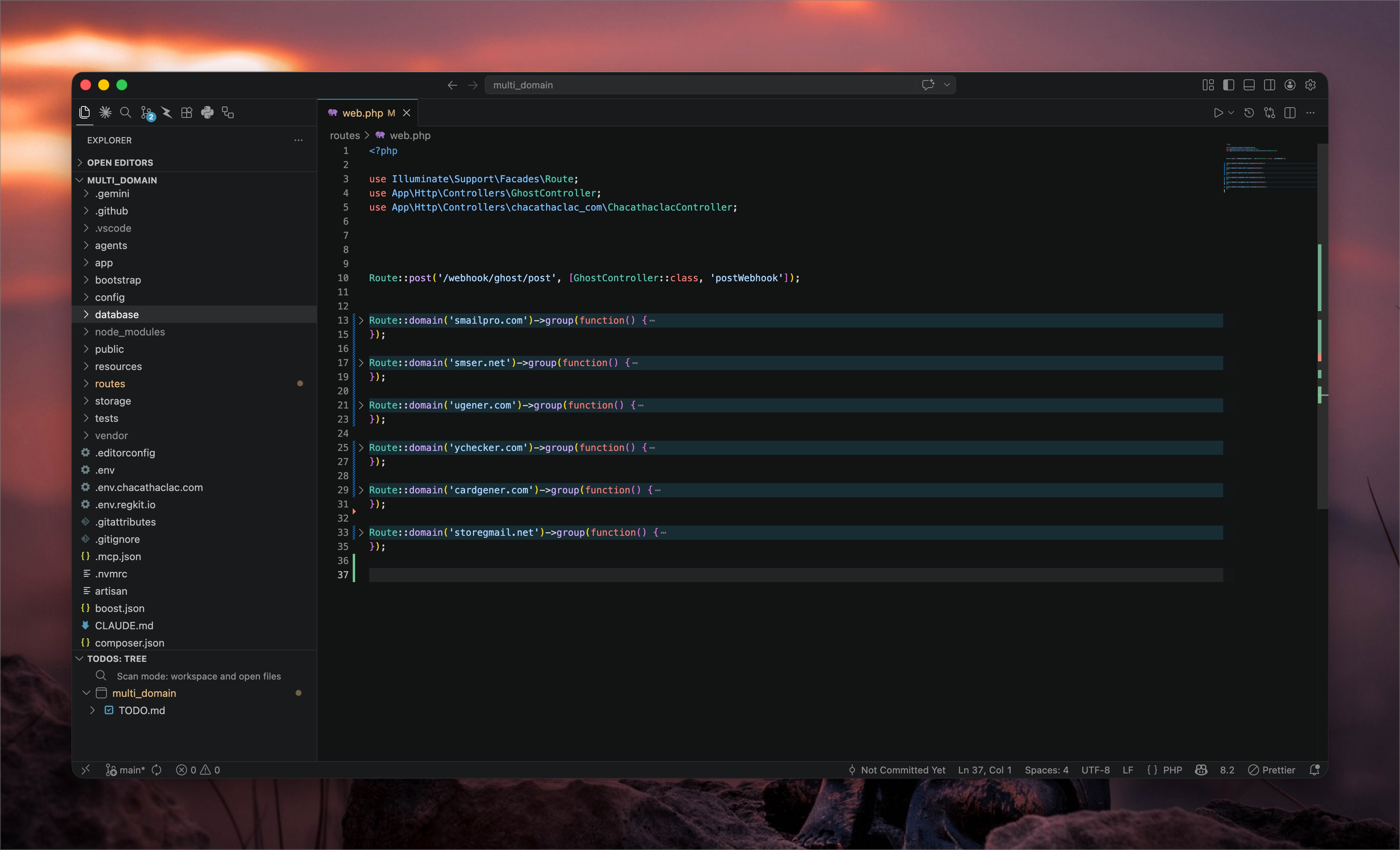
More importantly: shared authentication and integrated billing. Sign up on SmailPro once → you can use YChecker, UGener, CardGener without creating another account. One account, the whole ecosystem.
Same with payments. Instead of scattered payment flows across every site, I integrated Paddle exactly once into the codebase. Subscription management, webhook handling, refunds — all handled in one place, covering every product in the ecosystem.
And this lets the products actually work together. A SmailPro user needs to verify an email? YChecker is right there. Buy Premium on one product — every other service in the ecosystem knows about it. Everything runs smoothly because the user base isn't fragmented.
The result:
- Update once → all sites get it immediately
- Fix a bug in one place → fixed everywhere
- Integrate a new feature (like a payment gateway) once, and you're done
The Downside of "All-in-One"
Nothing comes without trade-offs. This approach is absolutely not a silver bullet for every kind of project. At its core, it was designed to make managing small sites and simple online tools that share a user base lighter and more manageable.
Use it for the wrong things and it'll go sideways fast:
- Personal blog or simple brochure site: This setup is massive overkill — the codebase overhead alone isn't worth it. Just use Ghost or WordPress.
- Enterprise system or large-scale startup: When your apps have complex core logic and completely separate domains, forcing them into one codebase turns everything into spaghetti. Fix one thing, break another. The blind spots are enormous.
This system truly shines when you're building a suite of mini SaaS tools or online utilities (like SmailPro, Smser) — consolidating resources in one place so you stay in control without burning yourself out.
Ghost Is More Than a Blog — It's How I Run the Whole Ecosystem
Most people know Ghost as a blogging platform. I started out using it that way too — write, publish, done. But after digging into it, I realized Ghost can do a lot more than that.
Member dashboard for the whole ecosystem. Ghost has native member management — I use it as a central CRM. Every member from SmailPro, YChecker, Smser, and the rest shows up in one place. No separate CRM tool, no Mailchimp, no HubSpot.
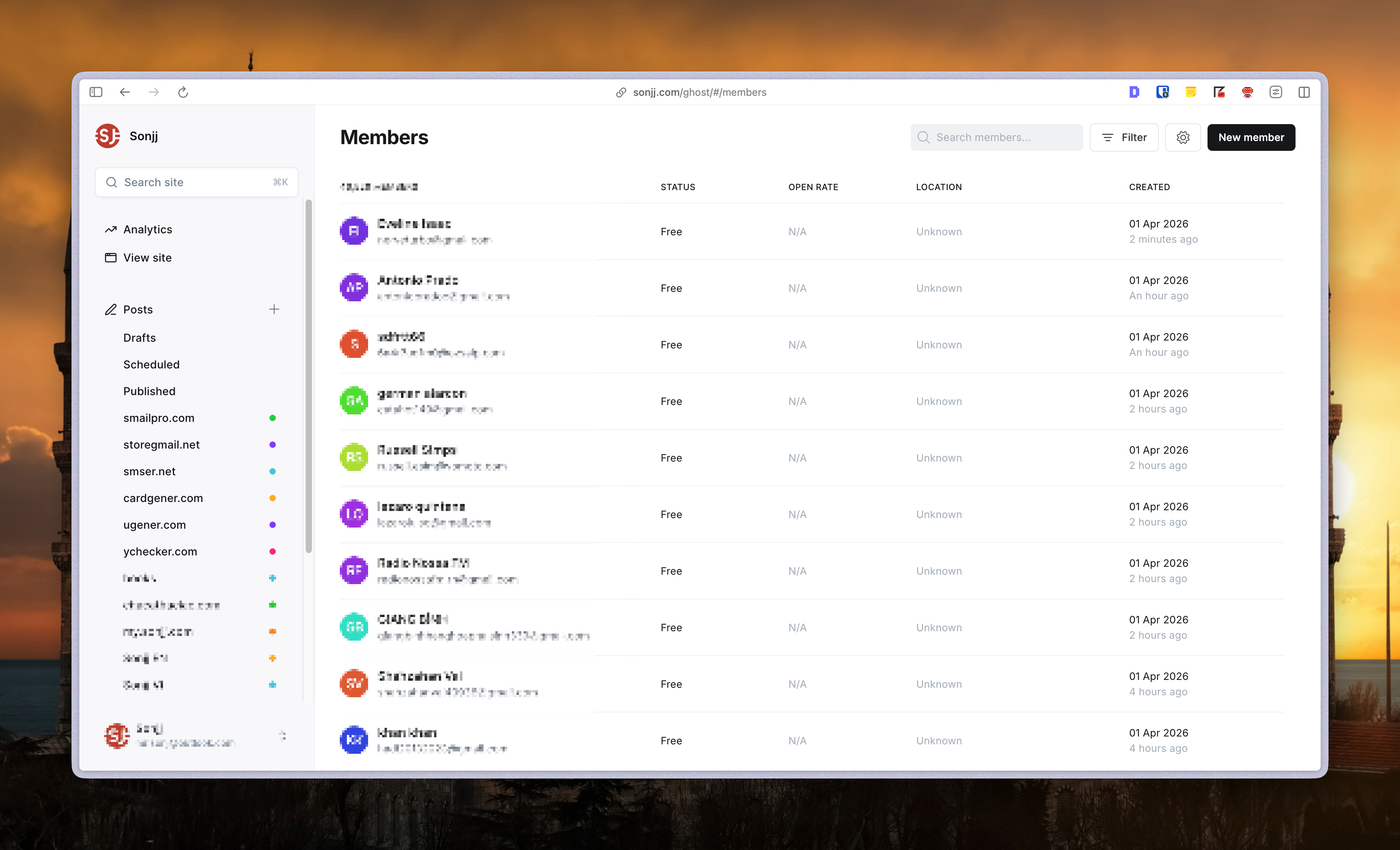
Built-in email marketing. Want to send a newsletter to all your users? Compose it in Ghost, hit Send. Mailgun handles the rest. Nothing else to set up.
Writer management. When someone writes for sonjj.com, they work directly in Ghost — draft, submit, and I review and approve right there. No onboarding to a new tool, no separate workspace, no complex permission setup.
But the real gem is the two-way sync between Ghost ↔ Laravel. Sign up for any product in the ecosystem → automatically become a Ghost member → automatically added to the newsletter list. The other way too: subscribe to the newsletter on sonjj.com → automatically get an account, ready to use any product right away.
I haven't seen anyone write about this two-way sync. Not because it's hard — but because not many people are running both Ghost and Laravel and want to connect them. The technical details will be in a dedicated post in the premium series.
What the System Runs So I Don't Have To
I slept 8 hours last night. Woke up to all the sites still quietly running. The last time I had to open half a dozen terminals to deploy to each server individually... I honestly can't remember.
Every time a new user signs up — the welcome email fires automatically. All these pipelines are handled by n8n, quietly running in the background, saving me a serious chunk of hours every month.
Server costs went down significantly too. Instead of every project dragging its own stack of tools and infrastructure, everything sits on Vultr and shares resources.
Plenty of solo founders I know are bleeding money maintaining 3–4 separate web apps. I'm running a whole suite of utility tools and the monthly cost is surprisingly manageable. The best part? Adding another product to the ecosystem barely changes the infrastructure bill.
Automation isn't about handling more work. It's about being able to close your laptop on the weekend — go out, go fishing, play with your kids — without the constant background anxiety about servers going down.
What's Next in This Series
This post is just the overview — the goal is to give you a picture of what the system looks like. The actual technical parts — how I set up each piece — are being documented in a dedicated series:
- Laravel Multi-Tenant Setup from Scratch — from blank codebase to domain detection, tenant isolation, shared auth
- Ghost + Mailgun + Two-Way Member Sync — why Ghost, how to connect it with Laravel, and how the data flows between them
- Automation Layer with n8n — how I got back a serious chunk of time every month
- Infrastructure & Server Setup — keeping costs low while everything runs smoothly
No specific timeline promised — but I'm documenting it step by step and will keep sharing. If you want to know when new posts drop, subscribing to the newsletter is enough. No spam. No sales pitches.
Subscribe for new posts — sonjj.com Newsletter
You Don't Need to Be a Genius — You Just Need to Value Your Time
This system wasn't built by a pro developer.
It was built by someone who values their time deeply — someone who, one night, was fixing the exact same bug for the third time across different sites and suddenly asked: "Is there a way to do this once instead of seven times?"
Ask that question enough times, and it eventually builds a system. Not because you're smarter than anyone — but because you realize there's too much good stuff out there to be spending your nights on repetitive maintenance.
If you're running multiple products and you're tired of the maintenance grind — this series is for you. Not to show off. To share what's actually worked, from someone who's running it every day.
Next up: Laravel Multi-Tenant Setup from Scratch.
No spam, no sharing to third party. Only you and me.